


Parasite SEO Through Hacking – When Your Website Starts Working for Someone Else
Your WordPress website seems okay. The homepage loads, the contact forms work just as well, and traffic seems stable. Yet underneath your own domain, Google may be indexing pages on gambling, adult content, and pharmacies that you’ve never heard of before.
Welcome to parasite SEO through hacking, where your website’s trust and authority are turned into free real estate for some spam. WordPress, with its plugin system and market presence, is the prime target.
This guide explains what hacked parasite SEO is, how attackers scale it through Google Search Console, the signs to watch out for, and the exact process of recovery.
What Does Parasite SEO Really Mean?
In regular SEO, the term “parasite SEO” refers to the publication of content on a third-party website which has high authority but only with permission. This could mean guest blogging or any form of sponsored content on reputable websites.
However, in hacked parasite SEO, an attacker hacks a reputable website and creates spam pages on it, all without the knowledge of the website owner.
Google categorizes such content as hacked and mentions page injection, the creation of unauthorized pages on a hacked website, as one of the most common types. In this case, the aim is not to sabotage the website. The attackers want to use the authority of the site to boost their spam ranking faster than a brand-new domain ever could.
The content created does not have anything to do with the business. For example, a website that manufactures goods could start ranking for betting keywords.
Why WordPress Sites are Ideal Targets
There are a lot of websites that use WordPress, which makes it an efficient target since one vulnerability in a common plugin or theme can expose thousands of sites at once.
These are some of the main vulnerabilities in a WordPress site:
- Outdated plugins or themes with known vulnerabilities
- Weak or reused admin passwords
- Unpatched WordPress core versions
- Compromised hosting accounts or FTP credentials
Once inside, an attacker rarely needs to touch your homepage. A single new page, hidden in a folder visitors never browse to, is enough to start ranking.
Anatomy of the Attack: From Hacked Page to Live Spam URL
The simplest version of this attack adds a new page by appending a slug to a URL that already exists and already carries some authority.
For example, if a business’s real page is:
- www.example.com/about-us/
An attacker can create:
- www.example.com/about-us/casino-bonus-offers/
The new page sits under a trusted domain, inherits some of its existing authority, and often goes unnoticed because it doesn’t touch the visible site at all.
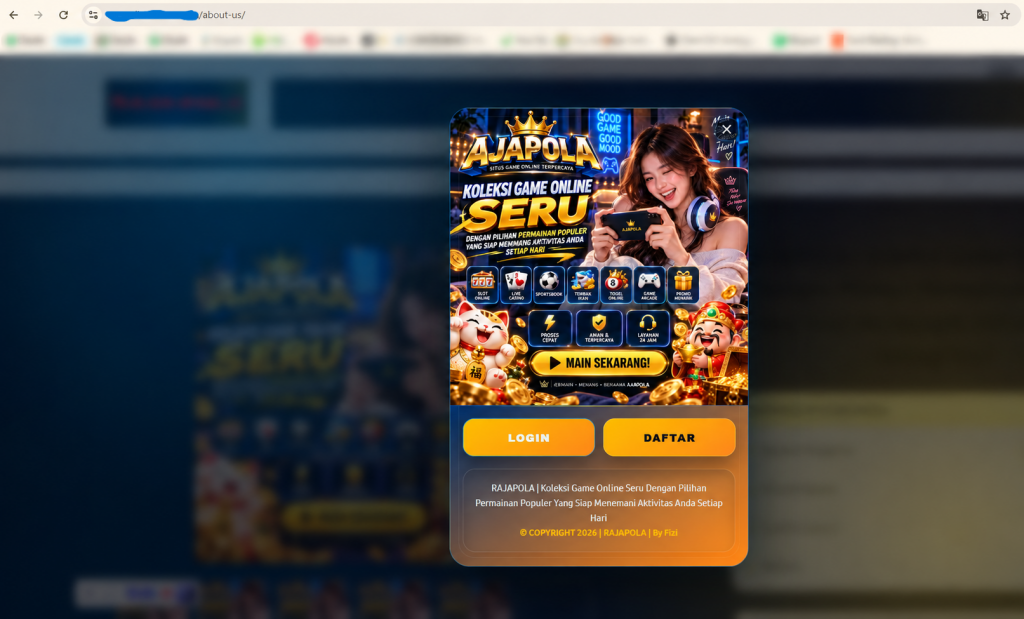
The content on that page has nothing to do with the business. Gambling, adult content, and pharmaceutical offers are the most common categories because they’re hard to rank for on a brand-new domain but valuable enough to be worth the risk.
Why Hackers Verify a Search Console Property — and How They Scale It
This is the step that often gets missed. After placing a spam page, an attacker frequently creates a separate, unauthorized property in Google Search Console scoped to that exact URL path, for example, a property for just www.example.com/about-us/ rather than the whole domain.
Why to bother? Search Console displays impressions, clicks, and ranking for whatever property it is scoped to. The hacker will only need to verify the hacked slug, and he will get an easy-to-use performance dashboard for his spam page without having to access the legitimate site owner’s account and data.
The reason why this is important is that this hack is scalable since the same method can be applied to other paths using the same URL format:
- www.example.com/about-us/casino-bonus-offers/
- www.example.com/careers/casino-bonus-offers/
- www.example.com/blog/casino-bonus-offers/
Each one is another spam page, each one can offer a different product (bets, pharmaceuticals, counterfeits), and each one can have its own Search Console property. One compromised site can end up quietly hosting an entire spam network, all tracked by the attacker in parallel.
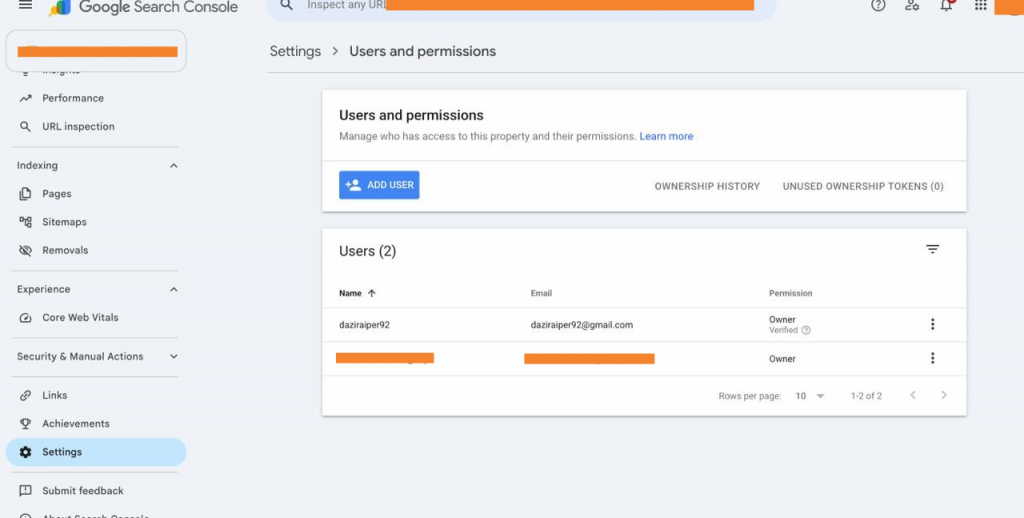
Verification is usually done through an HTML file upload or a meta tag, both of which only require write access to the website, which the hack has already handed the attacker. corrections over time.
Warning Signs Your WordPress Site Has Been Hit
- URLs you never created, usually an extra segment added to a real page (/about-us/random-offer/)
- Pages with a different look, font, or layout than the rest of your site
- Unrelated content such as gambling, adult, or pharmaceutical topics on a business website
- A site: search returning pages you don’t recognize (site:example.com casino)
- Unfamiliar users, plugins, or files inside wp-admin
- Properties or users in Search Console you never added
- Sudden traffic or impressions from completely unrelated search queries
- Emails from Google Search Console flagging a new property. If your main property is verified via the domain name method, GSC notifies you whenever any new property is created within that domain, including one an attacker creates
- The favicon shown next to your property in Search Console, or in the browser tab, looks different from your site’s actual favicon
The Recovery Playbook
Removing the spam page alone isn’t recovery. If the entry point is still open, or the attacker still has access anywhere, the pages come back. Work through this in order, don’t jump to SEO cleanup before the site itself is secured.
- Control the attack
If the attack is ongoing, prevent access to the infected site. Trace the source of infection via examination of files modified within the last few days, unknown administrator accounts, and new plugins. Change passwords for all admin accounts, hosting, and FTP/SFTP.
- Remove the infection
Delete the spam, malware code, and additional suspicious files and plugins. Compare the main WordPress files with those in the clean installation to identify an infection which isn’t obviously a spam.
- Patch the vulnerability
Upgrade WordPress core, all plugins, and themes to their latest secure versions. Uninstall any plugins and themes which are not being used; even a single unused plugin is an open door for attacks.
- Remove access to Search Console from the attacker
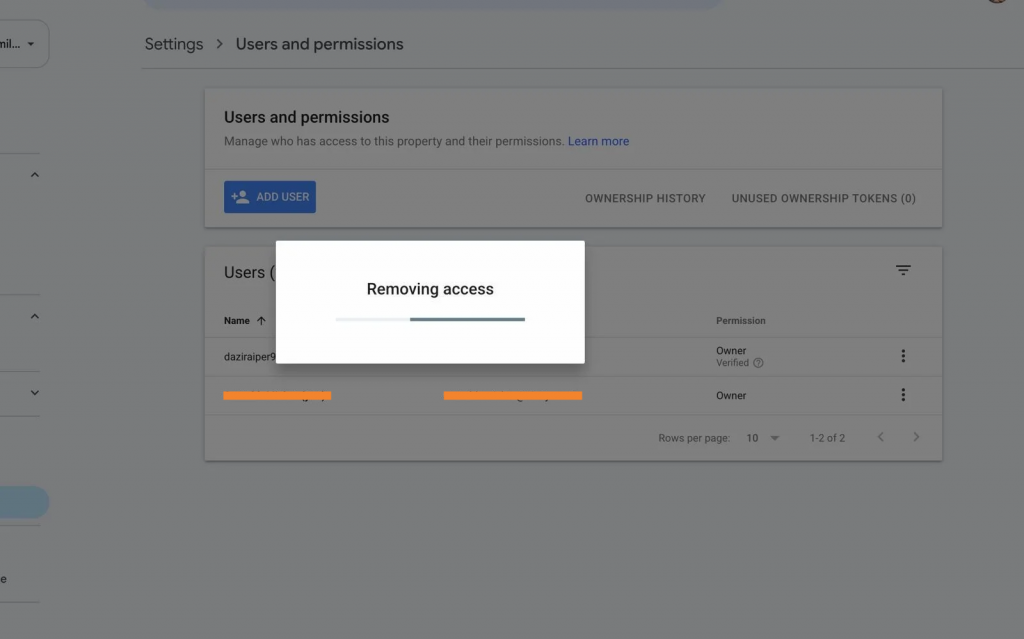
After cleaning the targeted page completely, add this exact page as a new property in Search Console. If the main property is already verified by the domain name method, then verification will happen automatically. Navigate to Settings → Users and permissions and remove the user of the attacker. Don’t forget to check Sitemaps and remove any sitemap submitted by the attacker for indexing.
- Verify the site again
If necessary, restore the site using a backup, fix any corrupted pages, check if there are any redirections to the spam page, and make sure that the database hasn’t been modified.
- Clean the search index
Perform a “site: search” to find any spam URL remaining in the index. Then request the removal of the URL in Search Console. Make sure that your sitemap includes only valid pages.
- Monitor the recovery
Track whether spam URLs drop out of the index, confirm no new unauthorized pages or Search Console properties appear, and watch organic traffic and rankings recover. Google needs time to recrawl a clean site today doesn’t mean the incident is fully resolved.
Actions That Need to Be Taken to Prevent Another Occurrence
- Perform backups of the website, and keep the backups separate from the website’s hosting location
- Install premium versions of the security plugins like Wordfence or Sucuri, and conduct security scans periodically
- Do not let WordPress update automatically since there could be a problem in a new release that is reported by the WordPress community
- Have a staging server so that the effect of the plugin and WordPress updates can be tested before deploying them
- Track the access granted to WordPress and provide only the access that is needed by each individual
- In case your business caters to a particular geographic region, then restrict access from other regions through a content delivery network (CDN) such as Cloudflare
Don’t Wait for Rankings to Drop
A hacked WordPress site rarely stays a one-time incident. Left unmonitored, it can escalate from a single spam page to a full index of unauthorized URLs, and from there, to lost rankings and real brand damage.
At Eiosys, we help brands recover from exactly this: securing the hacked site, removing unauthorized pages and Search Console access, and rebuilding the SEO signals that were affected. We also run ongoing website maintenance for WordPress sites, so vulnerabilities get patched before they ever become an entry point.
If you think your site may be compromised, or you’d rather not find out the hard way, talk to our team; we’ll investigate, secure, and recover it.
Frequently Asked Questions
Searchsite:yourdomain.com on Google and look for unfamiliar pages, such as gambling, pharma, or foreign-language spam. Other signs are unknown admin users, sudden spikes in indexed pages, a “Security issues” alert in Search Console, and redirects that only appear for visitors from Google.
WordPress powers a large share of the web, so attackers target it at scale. Most breaches come from outdated plugins and themes, weak or reused admin passwords, nulled (pirated) extensions, and poor hosting security. One flaw in a popular plugin can expose thousands of sites at once.
It’s when attackers break into a legitimate website and publish spam pages on it. The pages borrow the site’s domain authority to rank quickly for promotional keywords, usually gambling, pharma, or adult content. The owner often doesn’t know until traffic, rankings, or Search Console warnings change.
- Back up the site for forensics and enable maintenance mode.
- Change all passwords, including hosting, database, FTP, and admin accounts.
- Scan for malware and backdoors, and remove unknown users.
- Update core, plugins, and themes.
- Remove the spam URLs from Google.
Cleaning without removing the backdoor leads to reinfection.
Yes. Eiosys’s SEO services cover the search side of recovery: finding spam URLs in Google, getting them removed, fixing the indexing and ranking damage, and rebuilding trust with Google through Search Console. We also set up monitoring so new spam pages are caught early.
Yes. Most hacks use outdated plugins, themes, or weak logins. Eiosys’s website maintenance service handles regular updates, security scans, backups, and uptime monitoring, so vulnerabilities are patched before attackers find them.