

It is always a constant sprint to run a business. You spend hours copying data to other screens, answering the same email twenty times, and editing and fixing broken rows in spreadsheets. Old automation tools assisted in the routing of messages or the transfer of files around. The traditional scripts, however, fail to work if the vendor alters the PDF layout by two inches.
There, software agents can be used. Businesses all over India are going beyond the conventional and inflexible tools. The game has changed with modern AI workflow automation as these digital assistants actually read unstructured text, understand context, and complete multi-step tasks within your existing applications, without anyone having to hold your hand.
2. What Is AI Workflow Automation?
Remove marketing jargon, and AI workflow automation is just a combination of simple triggers, machine learning, and intelligent software assistants. Old school equipment requires a lot of rules that are “if this happens, then do that. This is all falling apart if one of the inputs has changed format.
Natural language processing (NLP) is used to process real-world, messy data in smart setups. An AI automation tool can open a weirdly formatted invoice scan, extract line items, and enter all the data into your accounting software without you having to type a single number.
It’s not only data piping anymore! This software actually reads the file, makes a decision on what to do, and actually does it. Collaborating with a trustworthy custom AI development provider can enable you to change those tedious manual tasks into automatic background work.
3. How AI Agents Actually Work Inside a Workflow
Understand how AI agents for businesses work, and don’t think of the same old chatbot windows. Consider an autonomous agent as a digital worker that is active. It will step out, track what just occurred, and take action throughout your apps.
Let’s take a look at what an agent does in his daily practice:
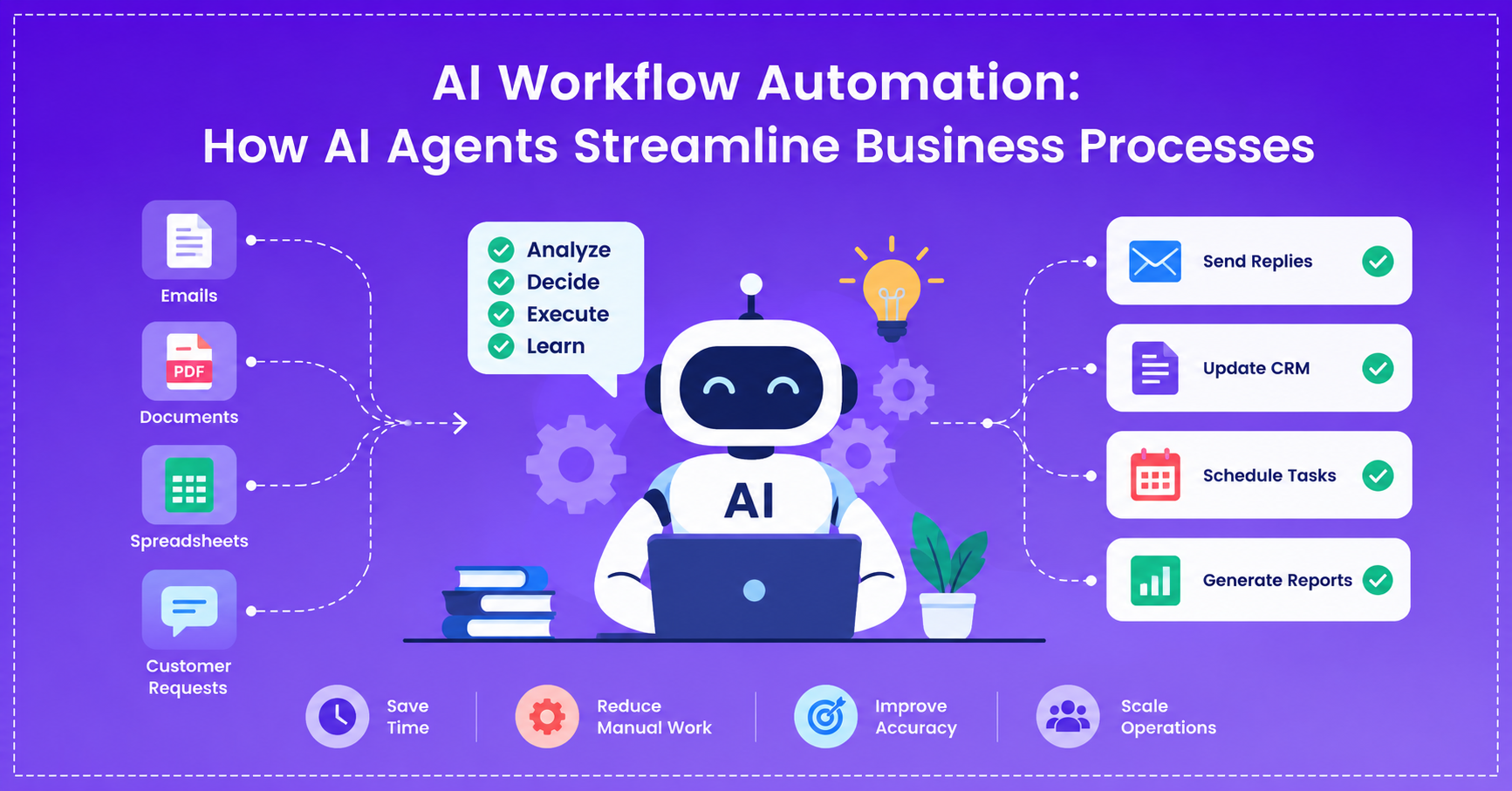
- Perception: A new event appears, perhaps a new customer e-mail, a vendor contract PDF, or a new leads list.
- Context Evaluation: The system reads the input to determine what he/she wants, its urgency, and what information may be missing.
- Decision Making: Selects appropriate software for the task given, according to your existing rules and security requirements.
- Execution: When the assistant is connected to specific APIs via targeted AI integration services, it can fire the API, log a CRM profile, send an email, or mark a teammate on Slack.
- Learning: It double-checks final results to sharpen up next time – and delegates out to a human manager if it is not 100% certain.
An experienced AI agent development company ensures that these processes operate seamlessly, avoiding the risk of exposing private company records.
4. Business Applications of AI Workflow Automation
AI automation teams create their own AI automation solutions for the business to resolve troublesome business operational bottlenecks. Here are a few specific examples of how they’re being utilized by companies today:
Customer Support Routing & Resolution
There are a tremendous number of messages that come in to support teams every day. Smart systems read incoming tickets, retrieve pertinent information from your ticketing database, and compose replies without delay. Complaints are directed to the senior manager straight away and accompanied by a summary.
Finance & Procurement Processing
When data is manually entered, it can result in silly typos. Messy receipts are read by intelligent AI automation solutions, compared to original purchase orders, and create approval requests within your ERP without having to type them.
Sales Lead Nurturing
Spending time checking leads repetitively is time-wasted and a waste of sales. Today’s AI business process automation captures web leads, validates business information on the web, scores interest levels, and adds meetings to sales calendars.
Onboarding and document review for HR.
Too much time is spent by HR teams on the verification of IDs and offer letters. Agents automatically verify documents, create customized welcome packages, and respond to common policy queries for new employees.
5. AI Workflow Automation vs Traditional Automation
The choice between the standard rule-based tools and agentic solutions is a function of the complexity of your work:
Feature | Traditional Automation (RPA / Scripts) | AI Workflow Automation |
Input Flexibility | Requires the data to be organized in some sort of structure, such as an Excel file | Reads poorly written text, audio clips, and graphics |
Adaptability | Follows the changing layout of our API format for an application | Adaptively adjusts to unexpected changes, on the fly |
Decision Making | Simple hard-coded rules | Decision based on learned rules, taking the context into account. |
Setup Effort | Needs to be mapped by hand for each step | Quickly learns what is required using the rules that are given to them promptly |
Scaling Capability | Limited to repetitive tasks and is not useful for complex tasks. | Manages business pipelines that are more complex and have more steps |
6. How to Implement AI Workflow Automation in Your Business
Smart systems need a clearly defined and consistent strategy for setting them up; otherwise, your workday could be a mess.
- Audit Operations: Identify repetitive and time-consuming office operations that can be performed at a high volume.
- Keep Organization Data Clean: Maintain accurate and organized organization documentation, guides, and customer data.
- Choose a specialist AI talent: Connect with AI agent development service providers who have experience to ensure secure connections and trustworthy AI models.
- Develop a Pilot Project: Go small! Start with an automation – such as sorting incoming attachments in email, or tagging leads.
- Implement Safety Guardrails: Do not replace humans in high-stakes decisions like money transfers, or for final decisions in contracts.
- Track and Adjust: Record and correct errors made, and save time to make corrections over time.
7. Choosing the Right AI Solution for Your Business
The secret to achieving the right set-up is matching your business needs with technology choices. If you’re just looking for some very simple assistance in writing simple emails, basic off-the-shelf software will do just fine. But in the case of custom operational flows, there is a need for strong integrations, extensive domain configuration, and data security.
Find a partner who is familiar with your local business setup and stack. A reliable team can help you develop your own agents, integrate them into your current software, and securely expand your digital infrastructure.
8. Conclusion
Smart tools are changing the company’s understanding of working times and staff. Do routine data entry tasks with digital assistants and focus your real staff on strategy, creative problem solving, and engaging with clients!
You can get rid of support queues, minimize the time needed to process invoices, or even create custom sales assistants, any of those are just a start for your process. Find out about custom solutions with Eiosys AI Enablement Services and start your upgrade today!
Frequently Asked Questions
Standard tools are based on fixed logic loops and break if formats change. Unstructured information is messy; AI agents can evaluate context and execute on their own to achieve goals.
Well, yes, provided that it is constructed properly. Encrypted connections, private server instances, and strong permission restrictions ensure that data is kept safe in enterprise configurations.
The time for a basic pilot project is 2 to 4 weeks. A complete enterprise system that is integrated with several CRMs and databases can be completed in 6-12 weeks.
Not at all. Modern agents connect to your existing software via APIs and webhooks, without having to replace any existing systems.